salesforce api riproar types integration: Which One to Use, When, and What to Migrate Before Summer ’27
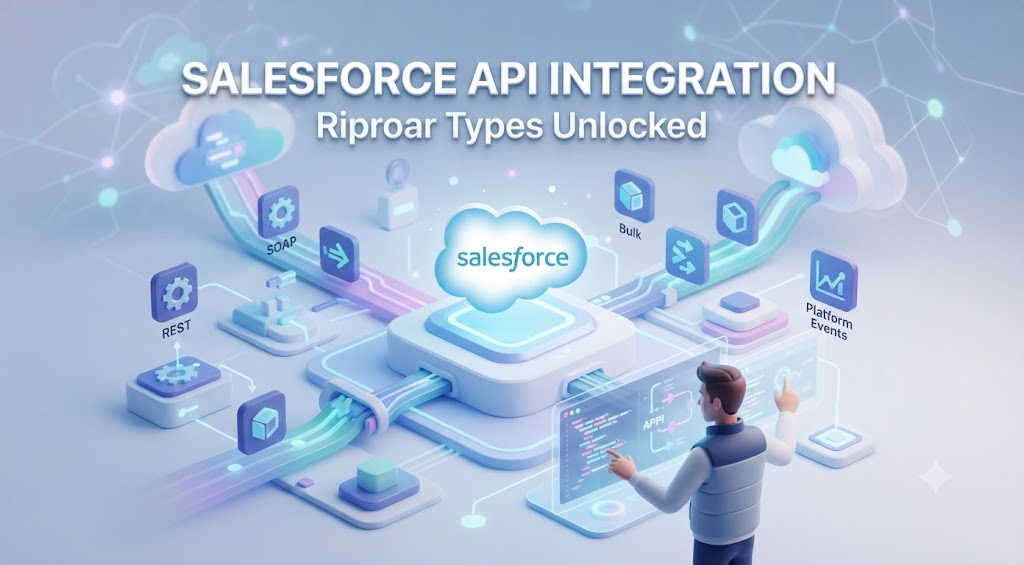
If you’ve ever pushed a Salesforce integration to production and watched it collapse under rate limits, schema drift, or an expired OAuth token — you already know that picking the wrong API costs real time and real money.
Most guides on Salesforce API integration types describe what each API does. This one tells you what breaks, what to avoid, and how to choose before you write a single line of code. It also covers what no other guide is talking about right now: the SOAP API retirement coming before Summer ’27 and what you need to migrate.
Let’s get into it.
What Is Salesforce API Integration and Why Does the Type You Choose Matter?
Salesforce API integration is the process of connecting an external system to Salesforce to read, write, update, or delete data — or to respond to events inside the org. The catch is that Salesforce doesn’t have one API. It has over ten, each designed for a different job.
Choosing the wrong one means:
- Blowing through daily request limits with REST API when you should have used Bulk
- Polling for record changes with SOQL queries when Streaming API would have pushed them to you
- Building on SOAP API right now, six months before its retirement window
The right Salesforce API integration type depends on three things: data volume, timing (real-time vs. batch), and direction (inbound to Salesforce, outbound from Salesforce, or event-driven).
The Full Salesforce API Comparison Table
Here is every primary API, what it does, and when to reach for it — in one place.
| API | Protocol | Format | Sync/Async | Best For | Avoid When |
|---|---|---|---|---|---|
| REST API | REST | JSON, XML | Synchronous | Standard CRUD, web/mobile apps | Volume exceeds 2,000 records per operation |
| SOAP API | SOAP/WSDL | XML | Synchronous | Legacy enterprise integrations | Any new build — being retired Summer ’27 |
| Bulk API 2.0 | REST | CSV, JSON | Asynchronous | 10,000+ record loads, migrations | You need a synchronous response |
| Streaming API / Pub/Sub | REST + gRPC | JSON | Asynchronous | Real-time change notifications | You need historical data retrieval |
| Metadata API | SOAP/WSDL | XML | Asynchronous | Deploying fields, layouts, workflows | Data operations — not built for records |
| GraphQL API | GraphQL | JSON | Synchronous | Fetching specific fields across objects | Full object retrieval is acceptable |
| Composite API | REST | JSON | Synchronous | Multiple operations in one API call | Single-record, simple transactions |
| Connect REST API | REST | JSON | Synchronous | Chatter, Communities, Experience Cloud | General CRM data operations |
| Tooling API | REST or SOAP | JSON, XML | Synchronous | Custom dev tooling, Apex execution | Production data operations |
| Apex REST / SOAP | REST or SOAP | Custom | Both | Custom business logic endpoints | Standard objects cover the use case |
The Decision You Actually Need to Make: A Practical Flowchart Logic
Skip the table if you’re in a hurry. Answer these four questions in order:
Step 1 — How many records are involved?
- More than 10,000 → Bulk API 2.0, full stop
- Fewer than 10,000 → move to Step 2
Step 2 — Do you need a real-time response?
- Yes, within the same transaction → REST API or Composite API
- No, background processing is fine → Bulk API 2.0
Step 3 — Are you reacting to record changes rather than initiating them?
- Yes → Streaming API or Pub/Sub API
- No → REST API for most standard operations
Step 4 — Are you deploying configuration (fields, page layouts, workflows)?
- Yes → Metadata API
- No → you’re back to REST
If none of these fit, you are likely dealing with a custom business logic scenario — reach for Apex REST API to build your own endpoint. roartechmental programming advisor from riproar
Deep Dive: The APIs You’ll Actually Use
REST API
REST API is the default for Salesforce API integration in almost every web or mobile context. It uses standard HTTP methods (GET, POST, PATCH, DELETE), returns JSON or XML, and is synchronous — meaning you get a response in the same request cycle.
When to use it:
- Creating, reading, updating, or deleting standard and custom Salesforce objects
- Building web apps or mobile apps that need live Salesforce data
- Any integration where volume stays under a few thousand records per operation
Most common production failure: Hitting the REQUEST_LIMIT_EXCEEDED error because the team didn’t account for daily API limits. Enterprise editions start at 100,000 requests per 24 hours on a rolling basis — not at midnight. Monitor your remaining calls with:
GET /services/data/v66.0/limits
Look for DailyApiRequests in the response. Set up API Usage Notifications in Setup before you ever go live.
Sample request — creating a Contact:
POST /services/data/v66.0/sobjects/Contact/
Authorization: Bearer {token}
Content-Type: application/json

{
  "FirstName": "Jane",
  "LastName": "Carter",
  "Email": "jane.carter@example.com"
}
Bulk API 2.0
Bulk API 2.0 is the right tool the moment you’re moving data at scale. It processes records asynchronously in batches and does not count against your daily REST API limit — it has its own separate governor.
Limits that matter:
- Max 10,000 Bulk API 2.0 jobs per rolling 24-hour period
- Max 150 million records processed per rolling 24 hours
- Each batch can hold up to 150 MB of data
When to use it:
- Data migrations from a legacy CRM into Salesforce
- End-of-month or nightly batch syncs with an ERP
- Any operation touching more than 2,000 records
The mistake teams make: Using REST API for a 50,000-record nightly sync because “it works in testing” — then watching it blow the daily limit in week two of production. Bulk API 2.0 is not slower for this job; it is faster and purpose-built.
Streaming API and Pub/Sub API
These two are related but not identical, and most Salesforce API integration guides blur the line.
Streaming API uses the Bayeux protocol and CometD. It’s what you reach for when you need push notifications from Salesforce to a subscribing client — without polling.
Pub/Sub API is the newer, gRPC-based replacement. It supports Change Data Capture (CDC) events, Platform Events, and custom channels. It delivers higher throughput and better reliability at scale.
When to use Streaming/Pub/Sub:
- You need to know the moment an Opportunity closes in Salesforce so your billing system can generate an invoice
- A support ticket created in Salesforce needs to instantly appear in Zendesk
- You want Change Data Capture on Accounts without writing SOQL polling jobs
Streaming API limits:
- Max 1,000 concurrent clients per org
- Message replay guaranteed within a 24-hour window
The key difference between Pub/Sub and Platform Events:
| Platform Events | Change Data Capture | PushTopic | |
|---|---|---|---|
| Triggered by | Publish action | Any record change | SOQL-defined criteria |
| Schema | Custom-defined | Auto-generated | SOQL-based |
| Replay | Yes (24 hours) | Yes (3 days) | Yes (24 hours) |
| Use when | Custom app events | Syncing any object | Filtering specific changes |
Composite API
Composite API is the most underused API in Salesforce API integration work. It lets you chain multiple REST API calls into a single HTTP request — which means one network round trip instead of five.
When to use it:
- You need to create an Account, then a Contact under that Account, then an Opportunity — all atomically
- You want to update 25 records in one call instead of 25 separate REST calls
- You need the result of one subrequest as the input for the next
Without Composite, creating that Account → Contact → Opportunity chain costs three API calls and three network round trips. With Composite, it costs one.
GraphQL API
Salesforce’s GraphQL API is the newest addition and is still expanding object coverage. The core benefit is precision: you specify exactly which fields you want from which objects, and the response contains only those fields — no over-fetching.
When it’s the right choice:
- Your integration only needs five specific fields from a Contact but REST API would return 60
- You’re building a dashboard that aggregates data across multiple objects in one query
- Payload size and performance matter in your client environment
Current limitation: Not all Salesforce standard objects support GraphQL yet. Verify coverage in the Salesforce developer docs before committing.
The SOAP API Retirement: What Every Team Needs to Know Right Now
Salesforce is retiring SOAP API before Summer ’27. If your integration — internal or customer-facing — runs on SOAP API, you have a migration window that is closing faster than most teams realize.
What this affects:
- Any integration using Enterprise WSDL or Partner WSDL to authenticate and query
- Apex SOAP callouts to external systems that call back into Salesforce via SOAP
- Third-party tools and middleware (MuleSoft flows, legacy ETL pipelines) that depend on SOAP-based Salesforce connectors
What to migrate to:
| Current SOAP Use Case | Recommended Replacement |
|---|---|
| Standard record CRUD | REST API |
| Bulk record operations | Bulk API 2.0 |
| Metadata deployment | Metadata API (SOAP remains for now — verify status) |
| Event notifications | Pub/Sub API |
| Custom web service endpoints | Apex REST API |
Migration checklist:
- Audit all connected apps and integration users using WSDL-based auth
- Identify any Apex classes with
WebServiceCallout.invoke() - Replace with REST-based callouts using
HttpandHttpRequestclasses in Apex - Test in a full sandbox before any production cutover
- Subscribe to Salesforce release notes — the exact deprecation date and phased rollout schedule will be published 90 days in advance
Do not wait until Q1 ’27 to start this. Teams that begin auditing now will migrate cleanly. Teams that don’t will be doing emergency re-architecture under pressure.
Authentication: What Actually Trips Teams Up
Every Salesforce API integration type uses OAuth 2.0, but the flow you choose matters.
Client Credentials Flow — use this for server-to-server integrations where no user is involved. POST to https://login.salesforce.com/services/oauth2/token with grant_type=client_credentials plus your Connected App’s client ID and secret.
Authorization Code Flow — use this when your customers are connecting their own Salesforce orgs to your SaaS product. Each customer authenticates, you receive a per-org access token, and you store and refresh it separately for each org.
What to avoid: The Username-Password OAuth flow (grant_type=password) is disabled by default on new Salesforce orgs and is being retired. Do not build new integrations on it.
The licensing blocker nobody mentions: After OAuth works, the next failure is API_CURRENTLY_DISABLED. This is not an authentication error — it means the integration user’s profile does not have API access enabled. Check: Setup → Profiles → [Integration Profile] → System Permissions → “API Enabled.”
Enterprise, Unlimited, Performance, and Developer editions include API access by default. Professional edition does not. You need the API Access add-on from Salesforce, which costs extra.
Governor Limits Reference: Every API in One Place
| API | Daily Limit | Key Cap | Counted Against REST Limit? |
|---|---|---|---|
| REST API | 100K+ (Enterprise) / 15K (Developer) | Per 24h rolling | Yes |
| Bulk API 2.0 | 10,000 jobs | 150M records / 24h | No (separate) |
| Streaming API | Per org | 1,000 concurrent clients | No |
| Metadata API | Per org | 10K retrieve/deploy per 24h | No |
| GraphQL API | Shares REST limit | Field-level query | Yes |
| Composite API | Shares REST limit | 25 subrequests per call | Yes |
Real Integration Scenarios Mapped to the Right API
Scenario 1: Syncing Closed-Won Deals to a Billing System in Real Time
Wrong approach: Polling REST API every 5 minutes for Opportunity updates. Right approach: Pub/Sub API with Change Data Capture on the Opportunity object. When StageName changes to “Closed Won,” the event fires immediately. Your billing system subscriber picks it up and generates the invoice. Zero polling, zero wasted API calls.
Scenario 2: Nightly Data Migration from a Legacy CRM
Wrong approach: REST API loop processing 200,000 Contact records one by one. Right approach: Bulk API 2.0. Upload a CSV job, let Salesforce process it asynchronously overnight, and check the failedResults endpoint in the morning. 200,000 records in a single job that doesn’t touch your REST limit at all.
Scenario 3: Creating an Account, Contact, and Opportunity in One Transaction
Wrong approach: Three sequential REST API calls with error handling stitched between them. Right approach: Composite API. One request, three subrequests, atomic execution. If Contact creation fails, Account and Opportunity don’t get orphaned.
Scenario 4: Deploying a Custom Field Across 12 Sandbox Orgs
Wrong approach: Manual configuration in each org. Right approach: Metadata API. Define the field in XML, deploy via Metadata API to all target orgs in a single CI/CD pipeline run.
Frequently Asked Questions
How many types of APIs does Salesforce have?
Salesforce has over ten APIs including REST, SOAP, Bulk 2.0, Streaming, Pub/Sub, Metadata, GraphQL, Composite, Connect REST, Tooling, Apex REST, and Apex SOAP. REST API covers the majority of standard integration use cases.
What is the difference between Bulk API 1.0 and Bulk API 2.0?
Bulk API 2.0 is simpler to use — it handles automatic batch splitting so you don’t need to manage batch sizes manually, and it supports CSV uploads natively. Use 2.0 for all new builds; 1.0 is legacy.
When should I use Pub/Sub API instead of Streaming API?
Use Pub/Sub API for new builds. It offers higher throughput via gRPC, a longer replay window for Change Data Capture (3 days vs. 24 hours), and better scalability. Streaming API is being superseded by Pub/Sub in most event-driven scenarios.
Can I use Salesforce API on Professional Edition?
Not by default. Professional Edition requires the API Access add-on, which is an additional purchase. Enterprise, Unlimited, Performance, and Developer editions include API access out of the box.
What is the difference between Platform Events and Change Data Capture?
Platform Events are custom event objects you publish explicitly — used for app-to-app messaging inside or outside Salesforce. Change Data Capture fires automatically when any record on a subscribed object is created, updated, deleted, or undeleted — no manual publish needed.
What does REQUEST_LIMIT_EXCEEDED mean and how do I fix it?
It means your org has hit its daily API request cap. Fix it by switching bulk operations to Bulk API 2.0 (which has a separate limit), implementing caching to reduce repeated identical calls, and using SOQL with specific field lists rather than full object retrieval. Monitor remaining calls at GET /services/data/v66.0/limits before large operations.
Is SOAP API being removed from Salesforce?
Yes. Salesforce is retiring SOAP API before Summer ’27. Migrate existing SOAP-based integrations to REST API (for CRUD operations) or Bulk API 2.0 (for high-volume data operations). Start your audit now — waiting until 2027 creates unnecessary risk.
What is the Composite API used for?
Composite API allows you to chain multiple REST API calls into a single HTTP request, using the output of one as the input of the next. It reduces API call volume and network round trips, making it ideal for creating related records (Account → Contact → Opportunity) atomically.

marcus james
Related articles

RoarTechMental Programming Advisor from Riproar: The Developer’s Mental Operating System for the AI Era
Contents Why US Developers Are Struggling in Ways No Coding Tutorial Addresses The 5 Core Principles — What They Actually…
Business Tricks Disbusinessfied: The Practical Guide Nobody Else Is Giving You
Contents What Business Tricks Disbusinessfied Actually Means Why Most Business Advice Fails in Practice Core Business Tricks Disbusinessfied by Function…

Culture Riproar Archives: The Complete Guide to What It Is, What It Covers, and How to Use It
Contents What Is Culture Riproar Archives? Why the Site Splits Content Across Domains What Topics Does Culture Riproar Archives Actually…